2025 Global Virtual 5K Time Submission Instructions:
- Login to the Race Rosters Website using the same email and password used to register
- Once logged in, click on “View/Post VIRTUAL RESULTS” BUTTON
- Submit Times
Option A: Runkeeper – If you use the app Runkeeper then you can choose to link your Runkeeper account to register for automatic upload.
- From your mobile device, go to your Race Roster dashboard for this event HERE and click “view registration”
- Click on “Connect to my app” button, where you will be asked to confirm your name within the app (confirm your name and the event will be added to your app)
- Revisit the Runkeeper app when you are ready to participate. From your start screen, click the flag symbol (bottom right) and select to start recording.
- Complete your distance and save the activity. Your results will be automatically posted to the Race Roster leaderboard.
- From the results page, click on your name to see your finisher summary and certificate.
Option B: Manual Upload – If you do not use Runkeeper and use a different app/device for tracking then you will need to submit a manual entry and include a picture of completed time on the app/tracking device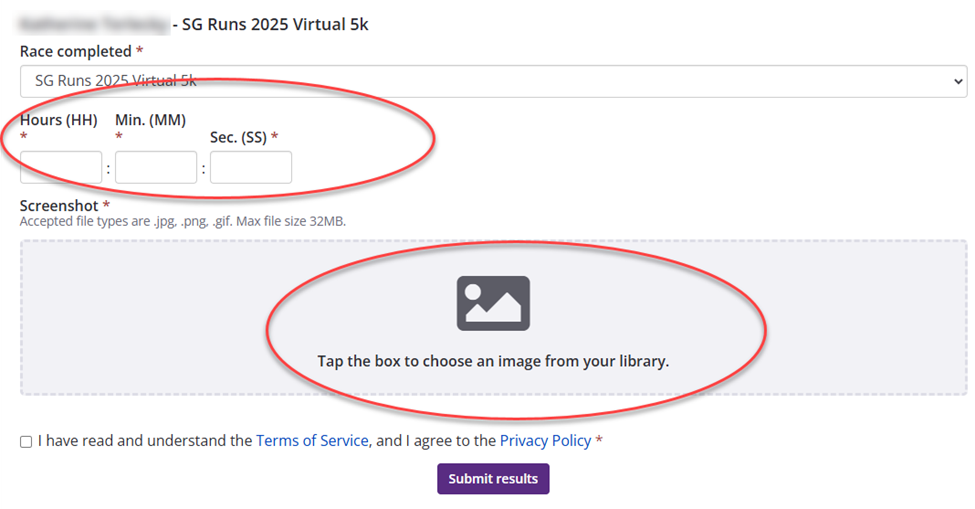
*Time Submissions must be completed by 5pm ET May 16th*
For any other questions, please reach out to lottery.communications@scientificgames.com