Collect Estimated Finishing Times right at registration

New Release | Estimated Read time – 7:00
Quick answer
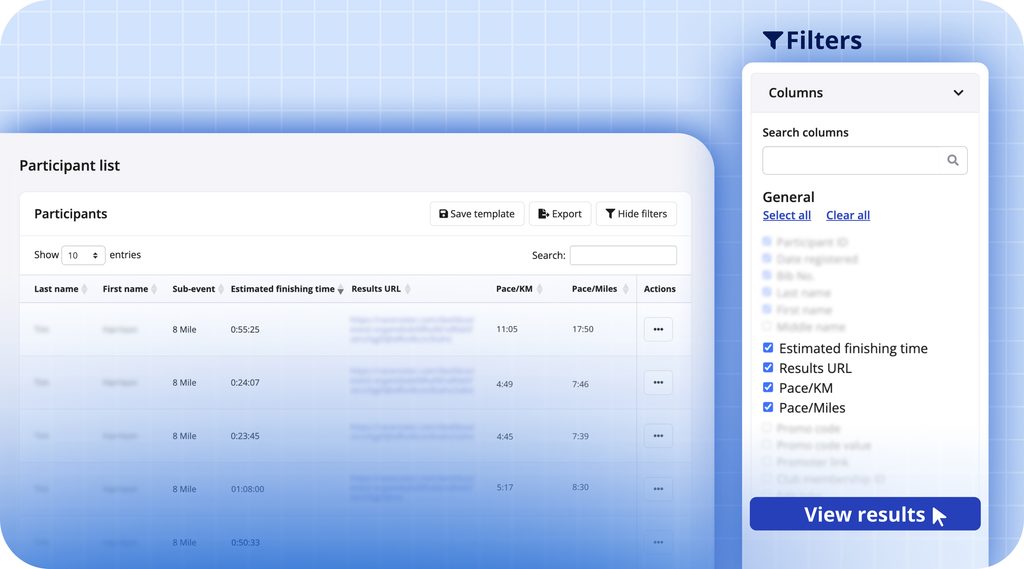
Race Roster’s Estimated Finishing Time feature lets organizers add a built-in question asking participants for a finish time or pace at registration. They can also ask participants to provide a result link as proof. These values appear in the participant list and exports, can be merged into campaign emails, and can be updated later by participants from their dashboard.
Our new Estimated Finishing Time collection feature gives organizers a smooth, simple way to gather this information. Turn on the built-in question, and participants enter their expected finish time or pace in a structured format. That data flows cleanly into the participant list, exports, and campaign emails, ready to use from the moment it arrives.
It’s especially valuable for events with corral assignments or qualifying standards, where accurate, consistent finish-time data helps you plan a smooth race day from start to finish line.
What does the Estimated Finishing Time feature do?
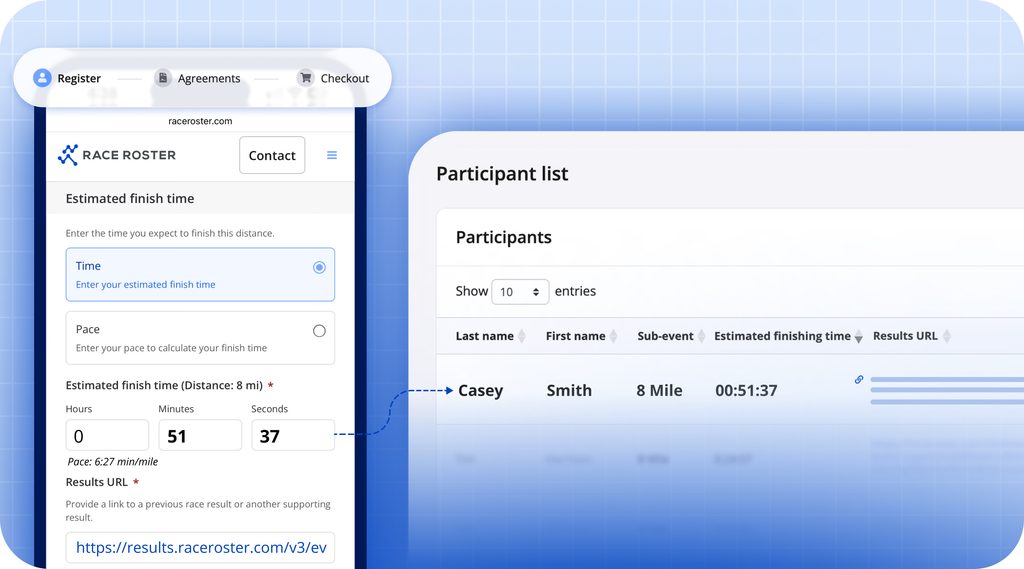
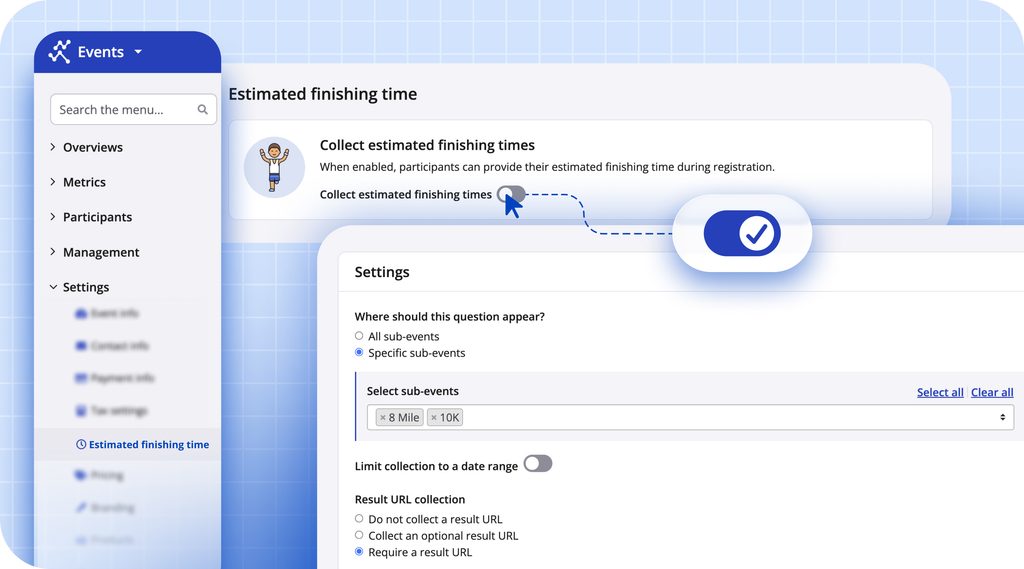
The Estimated Finishing Time feature adds a dedicated question to the registration flow, allowing participants to enter either a finish time or a pace (in min/km or min/mile). Organizers can turn this question on per event, and it works independently of start groups, so it fits events with or without corral-based starts.
The feature is off by default, giving organizers full control over whether and when to use it. When enabled, the data participants provide shows up directly in the participant list and in exports, with no manual cleanu/p required.
Why structured data matters more than free-text questions
Free-text custom questions leave room for inconsistent formatting, missing units, and typos. A structured Estimated Finishing Time field solves this by standardizing how participants enter their time or pace from the start. This structure means organizers can rely on the data being usable immediately, rather than needing to interpret or reformat responses after the fact.
For organizers managing qualifying programs or performance-based corrals, this consistency directly affects how smoothly race-day logistics come together.
How do participants enter their estimated finish time?
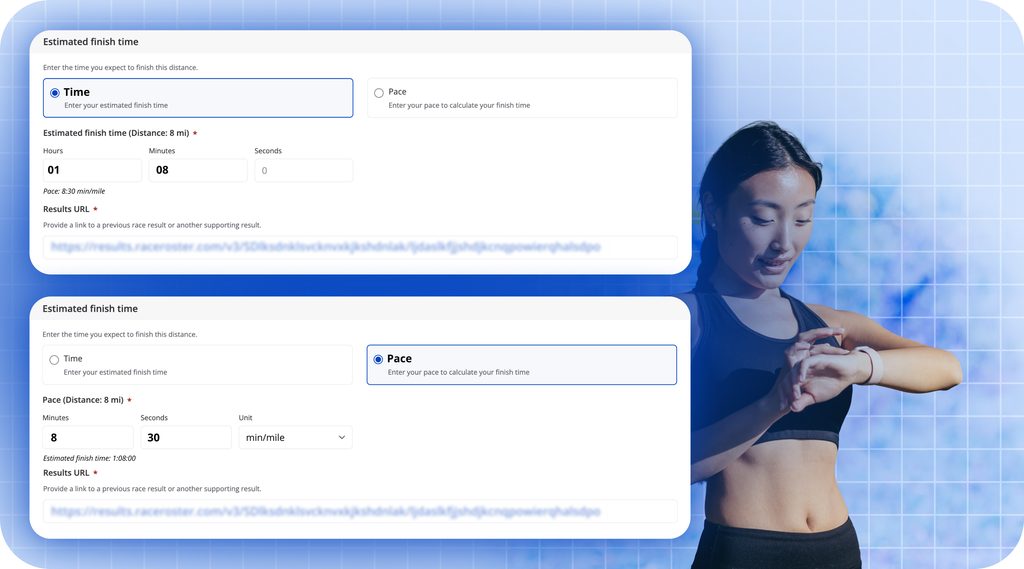
Participants choose between two formats when answering the Estimated Finishing Time question: a direct finish time or a pace expressed in min/km or min/mile. Whichever format they choose, the data is stored consistently and becomes immediately available to organizers through the participant list and exports.
Can participants update their estimate after registering?
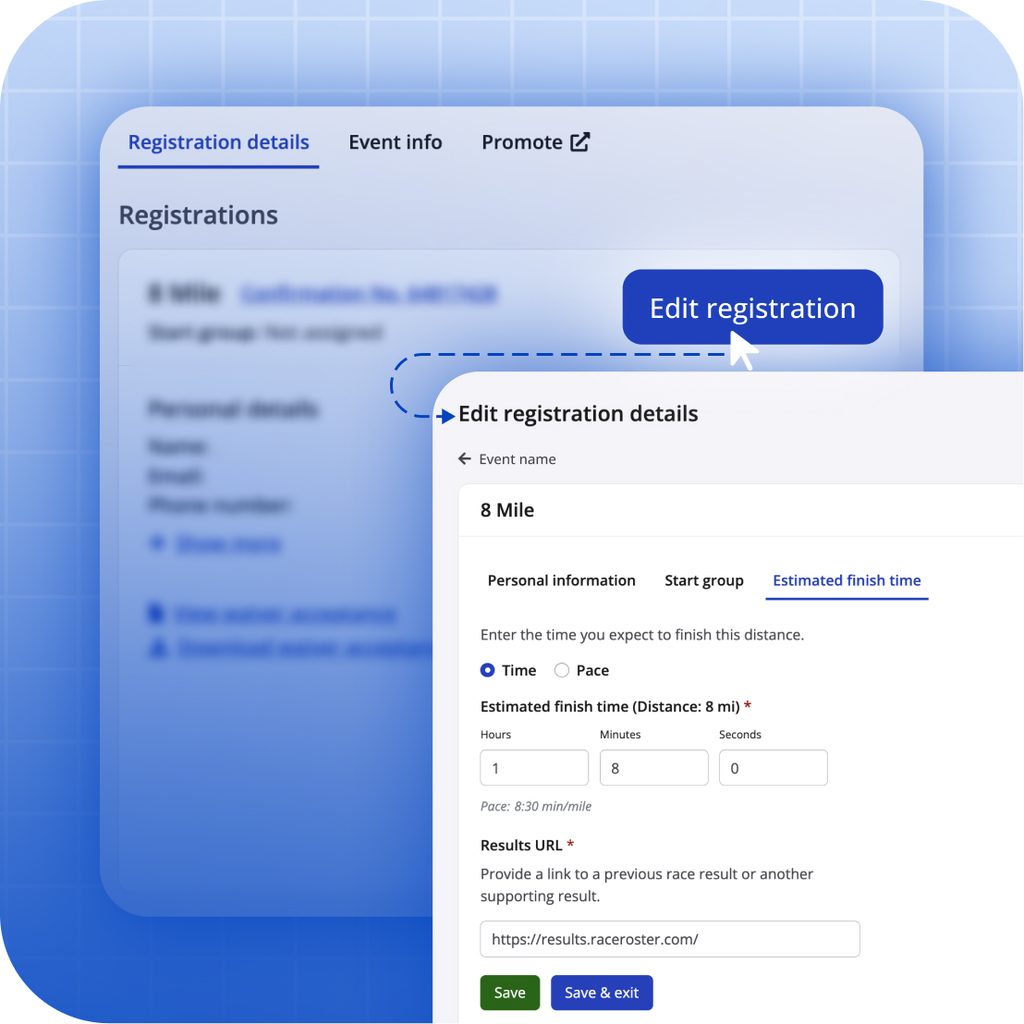
Yes. Organizers can optionally allow participants to update their estimated finishing time and proof link after they’ve registered. Participants do this from their participant dashboard, and any changes automatically sync with the participant list and exports, so organizers always have the most current information without having to follow up manually.
This flexibility matters because training doesn’t always go according to plan. A participant who registers months in advance may run faster or slower than expected by race day. Letting them self-correct their estimate keeps organizer data accurate without adding extra administrative work.
Can organizers request proof of a participant’s estimated time?
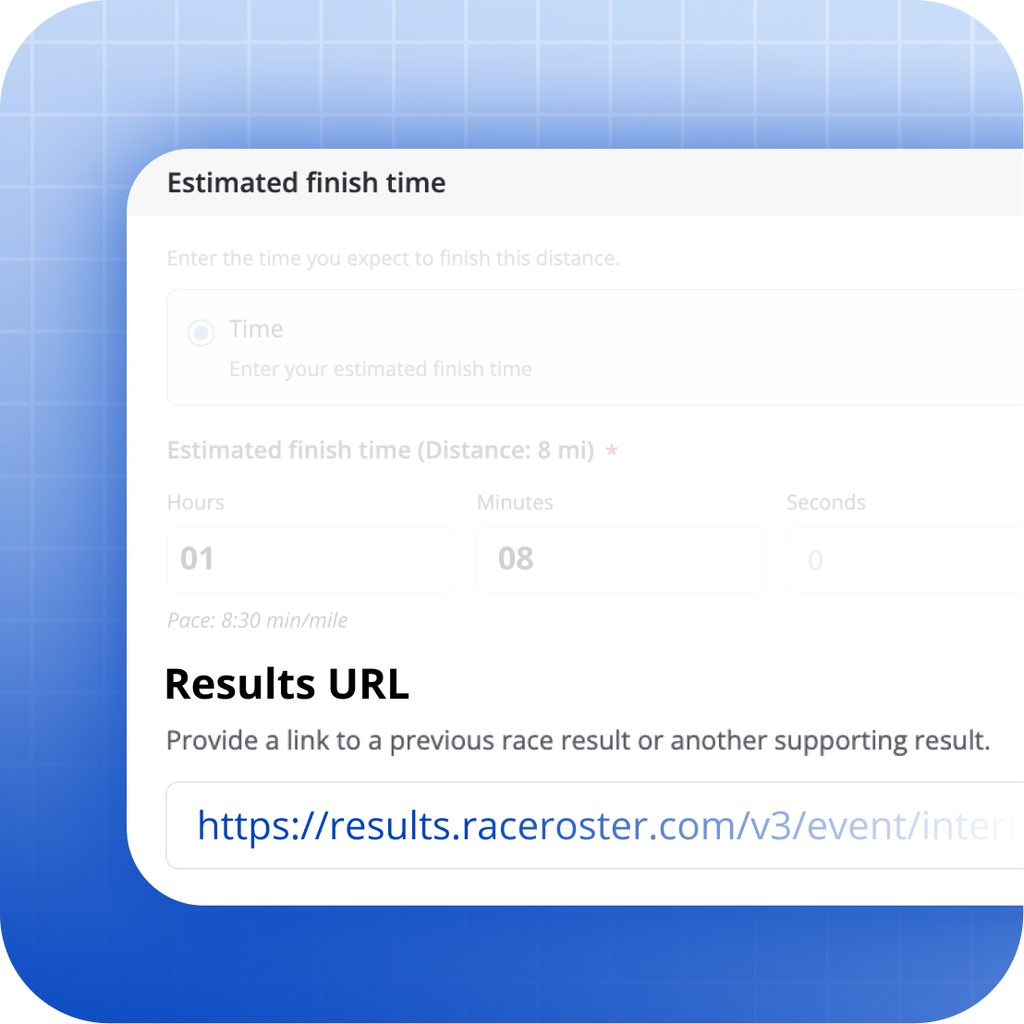
Organizers can optionally ask participants to submit a results link as proof of their estimated finishing time. This is particularly valuable for events that use finish-time estimates to determine eligibility, such as qualifying races or performance-based entry programs. Requesting a results link gives organizers a verifiable reference point instead of relying solely on self-reported estimates.
How can organizers use Estimated Finishing Time data in email campaigns?
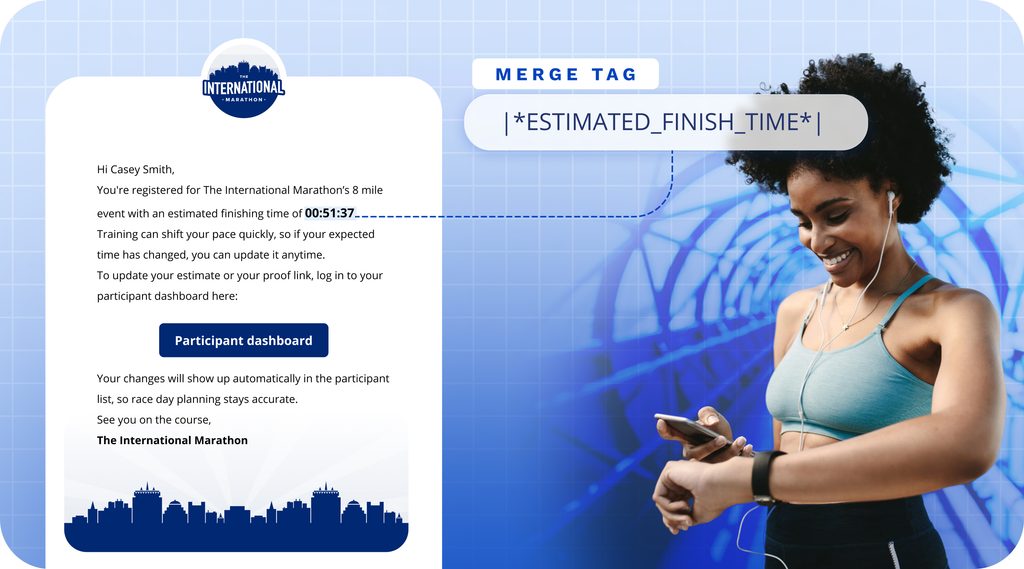
Once collected, Estimated Finishing Time data can be pulled directly into campaign emails using merge tags. Organizers no longer need to manually pull a spreadsheet, cross-reference participant times, and copy them into individual emails. Instead, each participant’s estimated time and, if collected, their results link, can populate automatically within a templated email.
Example: Qualifying programs that personalize communication at scale
A qualifying or high-performance program might customize the Estimated Finishing Time question to link directly to its qualifying standards, helping participants understand exactly what’s expected when they enter their estimate. From there, the organizer uses email merge tags so that application confirmation emails automatically include each participant’s estimated time and results link. This keeps communication personalized without requiring manual data entry for every applicant.
Example: Keeping participant records accurate after registration
Consider a participant who enters an estimated finish time at registration, then later realizes, after a few more weeks of training, that their actual pace will be faster or slower than expected. Because the organizer enabled self-service edits, the participant logs into their participant dashboard and updates their estimated time and proof link directly. The participant list and exports update automatically, so the organizer’s records stay accurate without any added effort on their end.
Choose Estimated Finishing Time if accuracy and efficiency matter to your event
Estimated Finishing Time is a strong fit for organizers running qualifying events, performance-based corrals, or any race where accurate pace data informs race-day planning. If your event doesn’t rely on finish-time data for logistics or eligibility, you may not need to turn this feature on. But for events where structured, verifiable finish-time information streamlines everything from corral assignments to applicant communication, this feature removes a significant administrative burden.
Because it’s off by default and configured per event, organizers can decide exactly when and how to use it, without affecting events that don’t need it.
Bring structured finish-time data to your next event
Collecting estimated finishing times no longer has to mean sorting through inconsistent free-text answers. With a built-in question, optional proof links, and merge tag support for campaign emails, organizers can gather accurate pace data from registration through race day, and let participants help keep it current.
If your event relies on finish-time estimates for seeding, qualifying standards, or personalized communication, consider turning on Estimated Finishing Time for your next race.
Learn how to enable it for your event.
Frequently asked questions
Does every organizer need to use the Estimated Finishing Time feature?
No. The feature is off by default, so organizers only need to enable it if their event benefits from collecting structured pace or finish-time data, such as qualifying races or performance-based corral assignments.
Does Estimated Finishing Time work with Start Groups?
No. Estimated Finishing Time and Start Groups are two separate features. Both can be enabled and used on their own, but they do not currently work together.
What format can participants use to enter their estimate?
All format options are available to participants when entering their estimated finishing time on the registration form. The available options are:
- Time: Participants can enter their estimated finish time using Hours, Minutes, and Seconds fields.
- Pace: Participants can calculate their estimated finish time by entering Minutes and Seconds, then selecting a unit from a dropdown: min/km or min/mile. The default unit shown in the dropdown is determined by your sub-event distance settings. For example, if ‘marathon’ is selected, the default unit will be min/km. If you select ‘other distance’ and enter 26.2 with the unit set to miles, the default will be min/mile.
Can participants change their estimated finish time after registering?
Yes, if the organizer allows it. Participants can update their estimated time and proof link from their participant dashboard, and the participant list and exports update automatically.
How do organizers use this data outside of the participant list?
Organizers can pull Estimated Finishing Time data into campaign emails using merge tags, allowing them to personalize communications like qualifying program confirmations without manual data entry.


What’s new at Race Roster?
Visit our what’s new page for the most noteworthy Race Roster updates!